
The state election commission (SEC) of Kerala has introduced a digital platform called eDROP (electronic Development randomisation of polling personnel) to make election duty management easy, faster and transparent. It is compulsory to complete Edrop institution registration at edrop.sec.kerala.gov.in. This online system allows institutions in Kerala to register and provide their staff details for election duty. e-drop Institution Registration online is very beneficial and can be completed easily without visiting any office or location. This whole process can be completed online.
Every government department office and local body that contributes employees for election work must register under the Drop Institution Registration System. In this blog, I am going to explain the importance of eDROP, registration steps, and how institutions can complete this process online.
What is edrop institution registration?
eDROP (election duty randomisation of personnel) is when online platform developed by NIC Kerala for State Election Commission (SEC Kerala). edrop Institution Registration is an online process launched by department of collegiate education Kerala to simplify registration and management of educational institutions. With the help of this official portal colleges can registered updates institution details upload Student data and manager academic records.
Used for following:
- Register institution that have staff eligible for election duty.
- Upload and manage employee data of random posting.
- Ensure transparent development of polling personnel.
- Automate the election duty assignment process.
Importance of edrop institution Registration
The deployment of a web-based solution, which is named e-DROP. This portal, developed by the National Informatics Centre (NIC), has helped the State Election Commission (SEC) to recruit nearly five lakh polling officials from across 50,000 institutions across the State in just a week.
- The whole process is online and ensures fair deployment of election staff.
- Everything happens digitally, no manual paperwork.
- All Institution and employee records are stored securely.
Highlights:
| Topic | edrop institution registration |
| State | Kerala |
| Full form | electronic Development randomization of polling personal |
| Primary Objective | make election duty management easy, faster and transparent |
| Benefits | Ensure transparency, data management, etc. |
| Year | 2025 |
| Mode | Online |
| Official website | edrop.sec.kerala.gov.in |
Who can register on eDROP?
The eDROP registration process open for:
- Government offices
- Local self government institution
- Educational institutions
- Public sector department and boards
- Semi Government organisations
Important Documents that are Required
Here is the complete list of documents that listed below:
- Aadhar Card of applicant
- Address Proof
- Voter id Card
- Employee Card
- Mobile Number
edrop institution registration online step by step process
Here is the complete process how Institutions can register on edrop.sec.kerala.gov.in
- Step 1: Go to the official website, i.e. edrop.sec.kerala.gov.in
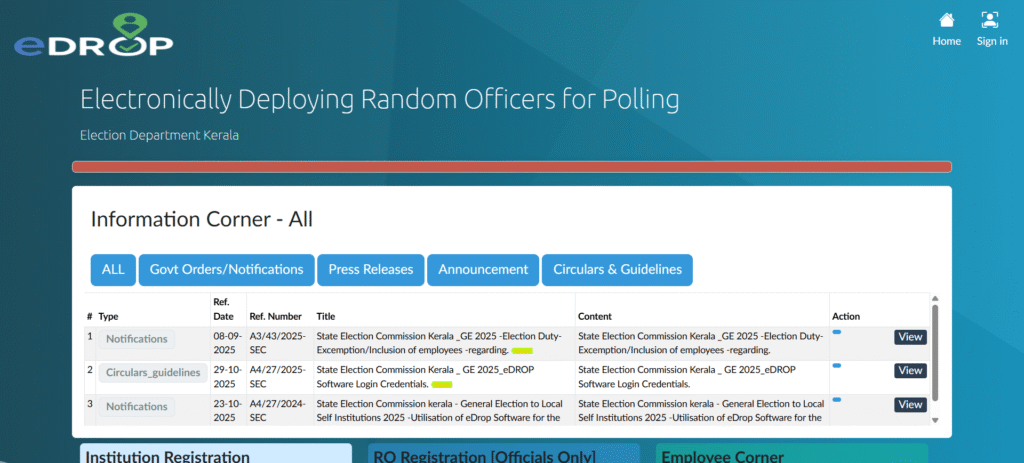
- Step 2: On the home page, you need to select the institutional registration option.
- Step 3: This will take you to a new page where you need to provide institution details:
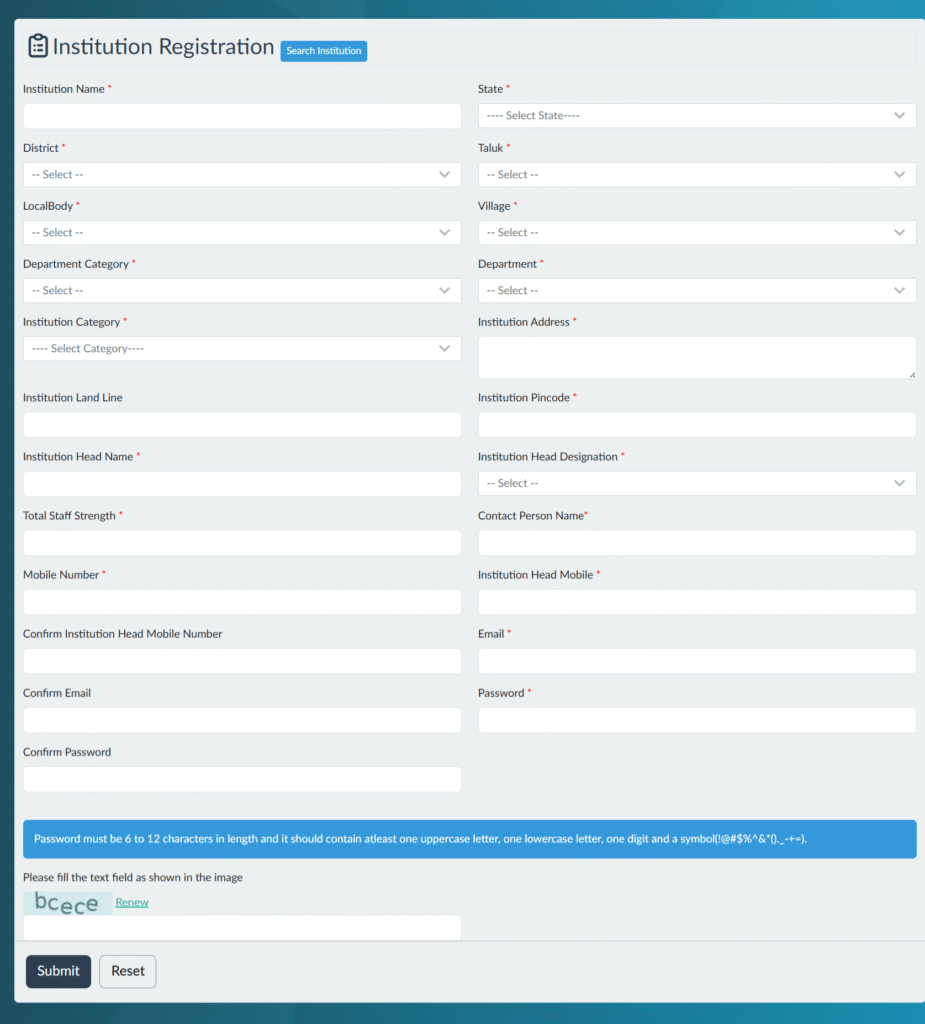
- Institution Name
- Type (government, educational, local body)
- District
- Institution code
- Address details
- Contact person, mobile number and email ID
After institution registration, you will get access to upload the following details:
- Name and designation
- Department
- Employee Code
- Mobile Number
- Aadhar Card
- After providing all these days your details with the verified by respective district Election Office.
- After approved your institution will be added to eDROP system.
- During election employees from institution will be automatically selected for the election duty based on randomization.
Edrop institution login
There are some certain step by step guidelines that you need to follow in order to complete your Edrop institution login.
- Go to the official website again.
- On the homepage you need to find login option.
- You need to enter the username and password.
- Also enter the captcha code and click on login option.
- Complete your login and access your dashboard.
Contact Details for Assistance
If you face any technical issues during registration, you can contact the District Election Office or the State Election Commission, Kerala through their official website:
- Website: https://sec.kerala.gov.in
- Developer: National Informatics Centre (NIC Kerala)
- Official Portal: edrop.sec.kerala.gov.in
FAQs – eDROP Institution Registration Kerala
Q1. What is eDROP Kerala?
eDROP is an online system by the State Election Commission Kerala for managing election duty of government employees.
Q2. What is the official website for eDROP registration?
The official portal is https://sec.kerala.gov.in/public/onser/edrop
Q3. Who can register on eDROP?
All government, semi-government, and local body institutions in Kerala that send staff for election duty.
Q4. How can institutions register?
Visit the eDROP portal, click on Institution Registration, fill in your details, and submit for approval.
Q5. Can employees register directly?
No, only institutions can register. Employees are added through their respective offices.